
The short answer: install Google’s Google & YouTube channel from the Shopify App Store, connect or create a Merchant Center account, and let it sync your catalogue. Approved products can then appear in free listings across Google. Whether they get approved depends on your product data and your store policies, which is where the mistakes below sit.
What Merchant Center does for a Shopify store
Merchant Center holds your product data and decides which products Google may show. Eligible products can appear in free listings on Search, Images, Lens, YouTube, Gemini and the Shopping tab, and every click goes to your own product page. Google is clear that free listing status gives permission to show your products, not a promise that they will be shown, and that only product pages appear, never your home page or policy pages.
How you created the account matters. Google says an account created through the Google & YouTube app on Shopify, for an eligible store, can start showing approved products in free listings automatically. If the account was created directly in Merchant Center, you need to check the free listings setting there yourself.
Free listings are not Shopping ads. Paid Shopping and Performance Max campaigns use the same product feed, but they are a separate decision with a budget attached, and they are a job for an ads specialist rather than for me.
Connecting Google Merchant Center to Shopify: the mistakes and where to fix them
Each of these has a fix in a specific place. Knowing which screen to open saves most of the time.
| Mistake | What it costs | Where to fix it |
|---|---|---|
| No Merchant Center account | No free product listings at all | Install the Google & YouTube channel |
| Barcodes (GTINs) left out of the variants | Google says products with a GTIN submitted without one may have limited visibility | Shopify product variant, barcode field |
| Your own SKU entered as the GTIN or MPN on branded stock | Google says incorrect identifiers can get products disapproved | Shopify variant, or the Google & YouTube channel |
| Every product marked as custom to clear the warnings | Branded products lose the identifiers that help them get matched to searches | Google & YouTube channel product settings |
| A vague returns policy, or contact details hard to find | Fails Google’s guidelines for keeping the account approved | Shopify policy pages, footer and Merchant Center business details |
| Prices that do not match the product page | Price mismatch issues in Merchant Center | Shopify tax and market settings |
| Nobody signs in to Merchant Center | Google asks for a sign-in at least once every 14 months to keep the account active | Merchant Center |
Product identifiers: the gap I see most
Unique product identifiers are the codes the manufacturer assigns: the GTIN (the barcode number, usually a 13-digit EAN on UK packaging), the MPN and the brand. Two retailers selling the same item share the same identifiers, which is how Google knows it is the same product. Google’s guidance is to supply them wherever a product has them, never to guess or borrow them from a similar product, and it warns that a product with a GTIN submitted without one may have limited visibility.
In Shopify, the GTIN goes in the barcode field of each product variant. For products with no GTIN, Shopify’s channel requirements say to add an MPN and brand instead, and warn that if the identifiers are wrong, Google may not publish the products and the account could be suspended. Variants count separately: a shirt in three colours needs three different GTINs, not one copied across all of them.
Before you type in a barcode, run Google’s own checks. A GTIN is numbers only, with the right number of digits for its type, and Google says not to use codes in the restricted ranges starting 2, 02 or 04. Google names the product’s packaging or its manufacturer as the most accurate source.
When your SKU is allowed, and when it is not
This is the point I see confused most often, partly because the rule changes with the type of stock:
- Branded stock you resell. Never put your own SKU in the GTIN, MPN or brand fields. If the product has identifiers but you do not have them to hand, Google says to leave the fields blank rather than fill them with values specific to your shop.
- Your own brand or private label. Google allows a unique number of your choice in the MPN field, and gives your product SKU as an example, with your shop brand as the brand
- Things you make yourself with no official brand. Use your shop name as the brand, with an MPN of your choice
- Vintage, antique or genuine one-offs. These may have no identifiers at all, but if a used or vintage item does carry a barcode, Google still wants it
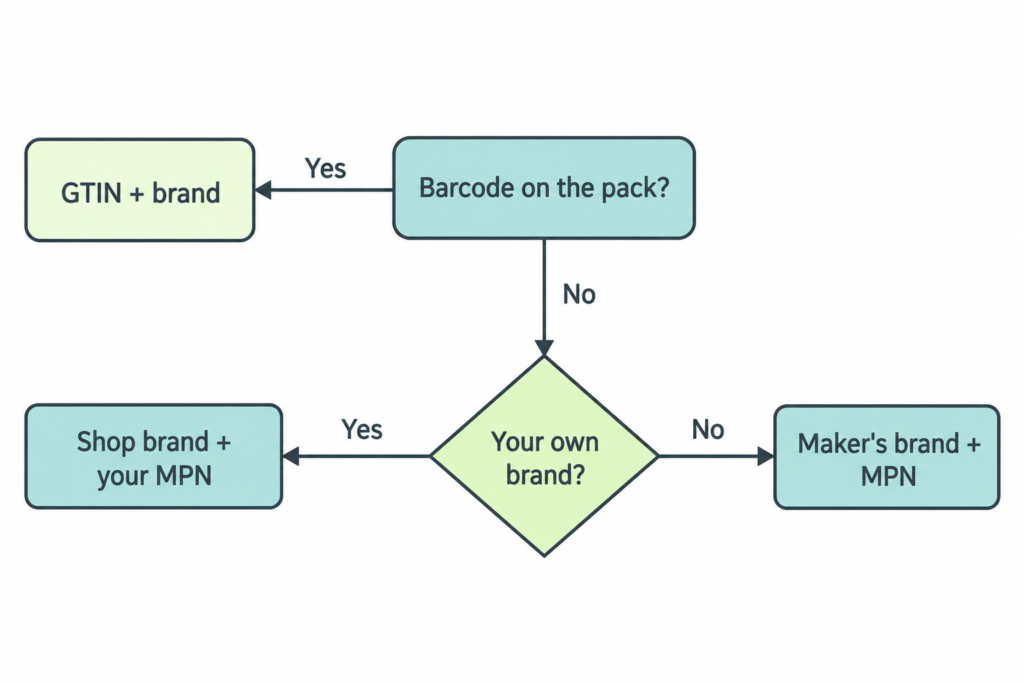
The quick fix I see used to clear the warnings is marking every product as custom in the channel. It works for genuinely custom goods. On branded stock it throws away the identifiers that help Google match your listing to a shopper searching for that exact product.
Store policies and contact details
Google’s guidelines for keeping an account approved ask for a returns and refunds policy that is easy to find and says what the customer has to do, when you accept returns, the time limit, and when they can expect their money back. If you do not take returns, Google still wants that stated. Your contact details must be clearly available, at least one conventional payment method must be offered, and a shopper must be able to add to basket and complete checkout.
On a product page I check where the delivery times and charges sit, and where the guarantee and returns policy appear, because a buyer looks for them before paying. Google applies a similar test to the whole store before it will show your products, so the work does two jobs at once.
Prices, VAT and the UK
For the United Kingdom, Google says the price you submit must include VAT, and the landing page must show the same price. If your Shopify store shows different prices to visitors from different countries, check what a product page displays to a visitor outside the UK. Store owners on the Shopify Community forum report price mismatch errors in Merchant Center traced to country-based tax display, so it is worth ruling out before you chase anything else.
Selling into Europe changed in September 2026
In mid-September 2026, free product listings and product carousels disappeared from Google search across the European Economic Area. ShopAppy puts the removal between 15 and 18 September, and Kelkoo Group links it to the European Commission’s Digital Markets Act ruling against Google. The UK is outside the EEA, and tracking by Productrise, reported by ShopAppy, showed no change in UK results.
So for a store selling mainly to UK buyers, free listings are still worth setting up properly. For a store that relies on EU customers, the free product block in EEA search results has gone. Products can still appear free on some other Google surfaces there, and Google has added a unit for direct sellers, but much of that search space now goes to comparison shopping services and paid ads. If most of your orders come from the EU, weigh that before spending weeks perfecting a feed.
Do you need a feed app?
Not to start. Shopify notes that the Google & YouTube channel is managed by Google, and for a small catalogue it does the job. I add a feed app only when the store needs something the channel cannot do, the same rule I apply to every app in a Shopify store’s SEO.
Common questions
Is Google Merchant Center free for Shopify stores?
Yes. Creating an account and showing products in free listings costs nothing. You only pay if you choose to run Shopping ads, which are separate from free listings.
Why are my Shopify products not showing on Google?
Approval gives Google permission to show a product, not a promise that it will. Start with the issues Merchant Center lists against your products, then check identifiers, prices against the product page, and your returns policy and contact details.
What do I enter for GTIN if a product has no barcode?
Leave it blank. If the product is your own brand, add your shop brand as the brand and a unique number of your choice as the MPN. Never invent a barcode.
Can I use my Shopify SKU as the MPN?
Only for your own brand or private-label products, where Google gives the SKU as an example of an acceptable MPN. For branded stock you resell, the MPN must be the manufacturer’s.
Do free listings still work for UK stores?
Yes. Free listings were removed from search across the European Economic Area in September 2026, but the UK is outside the EEA and UK results were unaffected.
If your products are in Merchant Center and you cannot see why they are being held back, my free assessment covers the product feed alongside the rest of the store, as part of my Shopify SEO services. Email info@orkismedia.com with your store address and the markets you sell into, or call 07827 598 774.