
The Shopify traffic guide: where your store's visitors really come from
Your reports can only tell you which channels sell if they file each visit in the right place. This guide shows you how to check yours, look at all eight channels in turn, and pick the one to fix first.
Get the designed 16-page guide, a channel scorecard, a tracking tag sheet and a 30-day plan, free.
Get the PDF and tools- Start with four numbers
- Eight ways visitors reach your store
- A real example
- Make your reports tell the truth
- Tag every link you control
- Fix the leaks
- Search and Google Shopping
- Paid ads and social
- Referrals, offline and Direct
- Offers that bring people back
- Your 30-day traffic plan
- When to get help
- Download the PDF and tools
1. Start with four numbers you already have
Revenue comes from three numbers multiplied together: visits, conversion rate and average order value. Returning customers then feed back into visits. When sales fall, one of these four has moved. Shopify shows all four, so write yours down before you read on.
| Number | What it means |
|---|---|
| Sessions | Visits to your store from every channel |
| Conversion rate | The share of visits that end in an order |
| Average order value | The average value of an order, after discounts |
| Returning customer rate | The share of customers who have bought before |
Compare each number with your own store a year earlier. Your own trend is evidence. An industry average is a guess.
Often missed: Shopify changed how it counts sessions on 21 to 23 September 2026. Compare sessions and conversion rate across that date with care, and check orders and sales too. Source: Shopify Help Centre
"Traffic and conversion are the two biggest issues store owners have. I work on both."Steve Bruckshaw, Orkis Media
Eight ways visitors reach your store
Google Analytics sorts every visit into a channel. Here is what each one is called and the check that tells you whether it is working.
| Channel | In Google Analytics | What to check |
|---|---|---|
| Organic search | Organic Search | Which pages earn visits, and which products get none |
| Google Shopping | Organic Shopping, Paid Shopping | Your product feed is approved and products are showing |
| Paid ads | Paid Search, Paid Social | Clicks land on the right page and the spend pays back |
| Email, if links are tagged | Welcome, abandoned cart and post-purchase emails are live | |
| Social | Organic Social, Paid Social | Which platforms send buyers, not just visitors |
| Referrals | Referral, Affiliates | Which partners, affiliates and press send sales |
| Offline | Direct, unless tagged | Every insert, flyer and event has its own code |
| Direct | Direct | How much of it is really untagged email or offline |
Often missed: packaging inserts. A next-order discount or refer-a-friend card reaches people who already buy from you. Give each one its own code, or its sales vanish into Direct.
Common mistake: treating Direct as a channel. It is where visits land when the source is unknown. If it grows, check untagged emails, print and packaging first.
A real example: one store's reports, read properly
These figures come from a UK online store I worked with in 2021 and 2022. The store's name is removed. Every number is exactly as its reports showed it.
Source: Google Analytics, Acquisition overview (the older Universal Analytics version). Seasons move traffic too, so compare with the same weeks a year earlier before crediting any one change.
What the reports were hiding
- Email posing as Referral. 1,148 December visits came from an email platform's link-tracking address. The links had no tracking tags, so the campaign was counted as Referral.
- PayPal taking the credit. paypal.com sent 112 visits in December from 83 people, only 1 of them new: buyers coming back after paying. List PayPal as an unwanted referral in Google Analytics.
- Organic Search is not only Google. Bing and Yahoo sent 162 visits in December between them, against 2,343 from Google. Small, but check them before you ignore them.
2. Make your reports tell the truth
Google Analytics files every visit under a channel, using the clues that arrive with the click. Miss a clue, and the visit and any sale it brings land in the wrong place. Check this before you judge any channel.
Where a visit gets filed
Simplified from Google's channel rules. Source: Google Analytics Help, traffic-source dimensions
Three ways the clues go missing
- Untagged links. Clicks from desktop email apps land in Direct. In the real example above, an untagged campaign showed up as Referral.
- Payment pages. Buyers who pay at PayPal and come back can be filed as visits from paypal.com, which takes the credit.
- Blocked tracking. Visitors who block cookies or tracking may not be counted, so Google's totals sit below Shopify's.
81,559 of 131,057 sessions from 20 September to 17 October 2026. Another 5% were Unassigned. Source: Google Analytics demo account.
Common mistake: cutting a channel because it looks small. Its sales may be sitting in Direct, filed under the wrong name.
Tag every link you control
Tracking tags are a few words added to the end of a link. They tell Google Analytics who sent the visit, so it is filed in the right channel. Customers never notice them.
utm_sourcesays who sent the visitutm_mediumsays what kind of link it wasutm_campaignsays which campaign
Google says to use these three tags on every link. Use the same words every time, in lower case: Google treats "Email" and "email" as different values, so mixed spellings split one source into two rows.
| Where the link appears | utm_source | utm_medium | Filed in GA4 as |
|---|---|---|---|
| Your newsletter | newsletter | email | |
| Facebook post | facebook | social | Organic Social |
| Instagram bio link | instagram | social | Organic Social |
| Facebook or Instagram ad | facebook | paid-social | Paid Social |
| Affiliate or partner link | partner-name | affiliate | Affiliates |
| Packaging insert QR code | insert | print | Unassigned, until you add an Offline channel |
Sources: Google Analytics Help, URL builders and default channel group.
Often missed: printed codes need one extra step. Google Analytics has no offline channel, so tagged QR codes land in Unassigned. Create a custom channel group with an Offline channel for the medium "print". A standard property allows two custom groups, and they apply to past data too. Source: Google Analytics Help, custom channel groups
Before you move on
- Build links with Google's free Campaign URL Builder, or the tracking tag sheet in the download
- Every email template's links are tagged
- Every social profile link is tagged
- Every printed QR code opens a tagged link
- Your naming list is written down
Fix the leaks
Three fixes stop sales being credited to the wrong place.
- Stop payment pages taking the credit. Add every payment provider that sends buyers off your site to pay, such as paypal.com. It works from the day you save it, not before. In Google Analytics, go to Admin, then Data streams, your web stream, Configure tag settings, Show all, and List unwanted referrals.
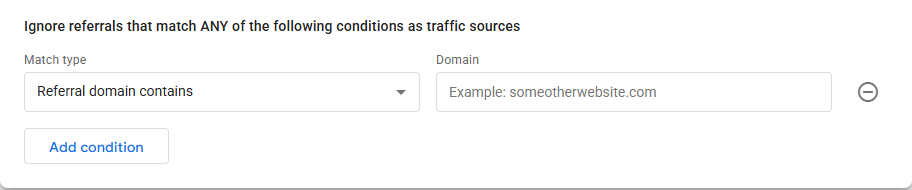
Type paypal.com in the Domain box, then Save. From my own Google Analytics property. - Install Google Analytics once. Connect it through Shopify's Google & YouTube sales channel. If a past developer also pasted the tag into your theme, visits get counted twice.
- Compare trends, not totals. The two never match: they count sessions differently, and Google misses visitors who block tracking. Use one time zone and watch the gap. A sudden jump means something broke.
"On every store assessment, my first check is whether Google Analytics records the same orders as Shopify. If it doesn't, every channel figure after that is suspect."Steve Bruckshaw, Orkis Media
Before you move on
- Payment domains on the unwanted list
- Google Analytics installed once
- Both set to the same time zone
- A monthly order check in the diary
Sources: Google Analytics Help, identify unwanted referrals; Shopify Help Centre, analytics discrepancies and setting up Google Analytics 4.
3. Check each channel in turn
Start with the two Google channels you don't pay per click for.
Organic search: check it in Google Search Console
- Which pages earn the clicks. Open Performance, then the Pages tab, sorted by clicks. If the homepage takes most of them, your collection and product pages are doing little work.
- Pages that are seen but not clicked. Lots of impressions and few clicks means Google shows the page, but searchers pass it by. Rewrite its title and description before writing anything new.
- Products that never appear. If a product page is missing from the Performance report, open Indexing, then Pages, to see whether Google has left it out and why.
Google Shopping: get the free listings right first
Google shows products from Merchant Center for free on the Shopping tab, in search results and in Google Images. Shopify's Google & YouTube channel sends your products there automatically.
Google doesn't promise to show every product. It chooses based on the product data you give it, so the data is where the work is.
Check in Merchant Center
- No products flagged with problems
- Clear titles, images and prices
- Barcodes (GTINs) added where products have them
- Shipping and returns set up
Often missed: Bing. The store in the real example got 162 visits in December from Bing and Yahoo. Bing Webmaster Tools is free and works much like Search Console.
Sources: Google Merchant Center Help, free listings for products; Shopify Help Centre, set up the Google & YouTube channel.
Paid ads and social
Paid traffic is the easiest to buy and the easiest to waste. Check three things before you spend another pound.
- Sales are tracked. If purchases don't reach the ad platform, it can't tell good clicks from bad ones.
- Clicks land right. An ad for one product should open that product, not your homepage.
- Spend pays back. Each sale must cost less in ads than the profit it brings. Work out your limit below.
Your break-even point
| Line | Example |
|---|---|
| A. Average order value | £60 |
| B. Margin you keep after product and delivery costs | 40% |
| C. Most you can pay in ads per sale (A × B) | £24 |
| D. Sales each £1 of ads must bring in (1 ÷ B) | £2.50 |
Example figures to show the sums, not a benchmark. Below line D, every sale from ads loses money.
Social: judge it by sales. In GA4's Traffic acquisition report, compare Organic Social and Paid Social by revenue, not sessions. A platform that sends visitors but no buyers is a brand cost, not a sales channel.
Common mistake: boosting the post with the most likes. Likes never appear in your sales report.
When to get help: I've run ad accounts for stores for many years. If your spend isn't clearing line D, my free store assessment looks at why.
Email: the channel you own
No platform can take your email list away or charge you per click to reach it. It is also how one-off buyers become regulars.
Grow the list in three places: a sign-up box at checkout, a sign-up in the footer, and a pop-up with a reason to join.
| Automated email | When it sends | What it does |
|---|---|---|
| Welcome | When someone subscribes | Says who you are, what you sell and why people buy from you |
| Abandoned cart | When someone leaves without buying | Reminds them what they left. My three-email version is below |
| After purchase | After the order arrives | Thanks them, helps them use the product and asks for a review |
| Win-back | When a customer goes quiet | Gives a past buyer a reason to come back before they forget you |
Shopify's own marketing automations have templates for all four, and can send a series of emails with a wait between each. Source: Shopify Help Centre, marketing automations
- New subscribers need to give consent by a clear action. No pre-ticked boxes.
- Customers can get emails about similar products under the soft opt-in, if you offered an opt-out when you took their details.
- Every email must say who it is from and give a simple way to unsubscribe. Sole traders count as individuals.
Source: ICO guidance on direct marketing using electronic mail. This is a summary, not legal advice.
Before you move on
- Tracking tags on every email link
- Welcome email live
- Abandoned cart email live
- Unsubscribe link in every email
Referrals, offline and Direct
These are the channels people forget to measure, so their sales get credited somewhere else.
Referrals. Open Referral in GA4 and sort by revenue. The sites at the top are sending buyers: thank them and ask what else you could do together.
Affiliates and refer-a-friend. Give each partner a tagged link and their own discount code. Then you can pay on results, and see who sends sales.
Packaging inserts: the same card, done two ways
| Done badly | Done well |
|---|---|
| One code for everyone, such as THANKYOU25, and an untagged web address. You can't tell what the card earns. | Its own code for this batch, such as BOX-OCT26, and a QR code that opens a tagged link. Every sale it brings is counted. |
Codes are for an invented brand, to show the idea.
What Direct really holds
- People who typed your address or used a bookmark
- Clicks from untagged emails in desktop email apps
- Print, packaging and events with no code or tagged link
- Visits where the clue to the source was lost
The test: if Direct rises in a month when you sent more email or posted more inserts, the tags are missing.
The takeaway: every piece of print gets its own code, and every partner gets their own link.
4. Offers that bring people back
The card in the box, the cart reminder and the planned sale.
The card in the box: a next-order discount or a refer-a-friend offer, each with its own code, as in the inserts example above.
My three-email cart sequence
Only the last email carries an offer.
- A gentle nudge. "Did you forget your cart?" No offer, just a reminder.
- A second reminder, two days later. If the item is on offer, say when the offer ends or that stock is limited.
- The offer. An extra percentage off if they buy before a set date.
Build it in Shopify's own marketing automations, or in your email app. Change it often, and check the numbers regularly. In my experience, scarcity works, as long as the deadline is real.
Keep the deadline real. Falsely claiming an offer is only available for a very limited time is a banned practice under the Digital Markets, Competition and Consumers Act 2024. If it ends on Friday, end it on Friday.
Plan every sale at the start of the year
The wallchart method I use:
- List the dates. Every shopping event and holiday in your market. An AI assistant can draft it; check the dates.
- Pick yours. Mark the ones that suit your products on a wallchart.
- Prepare early. Write the copy and design the banners well before. Upload them ready to switch on.
- Show it everywhere. Banners on the home page, collection pages and every relevant product.
- Tell Google. Add the discount to Merchant Center so it shows in Shopping.
Often missed: reuse the same sale page address, such as /black-friday, every year, so the links it earned keep working.
Sources: Shopify Help Centre, marketing automations; Business Companion, protection from unfair trading (England, Scotland and Wales). In Northern Ireland, see NIbusinessinfo. Google Merchant Center Help, get started with Promotions.
5. Your 30-day traffic plan
Work through it one step at a time. The fillable version is in the download.
- Write in your four numbers for the last 30 days and the same period last year, and note whether each went up or down.
- Find the one that fell most. Sessions: work through chapters 2 and 3. Returning customers: the email and offers sections. Conversion rate or order value: fix these on your store, not with traffic.
- Pick one channel to fix first: organic search, Google Shopping, paid ads, email, social, referrals, offline, or Direct and tracking.
- Set three actions, with a date for each.
- Pick the date you'll check your numbers again.
When to get help
You can do everything in this guide yourself. These are the signs a second pair of eyes is worth it:
- Your reports don't match your orders
- Visitors keep falling and you can't see why
- Ad spend isn't clearing your line D
- Plenty of visitors, but too few of them buy
What my free store assessment covers
In this order, with access to your store:
- Traffic: how many visitors, and where they come from
- Orders: Google Analytics against Shopify, looking for gaps
- Conversion: rates by source, cancellations, abandoned carts and how many are recovered
- Structure and SEO: how the store is organised, and what holds it back in search
- Pages and trust: collections, menus and product pages: names, descriptions, delivery, refunds
- Speed and search data: page speed, Search Console, then a deep look at Google Analytics
Send me your store address. I'll look at your traffic and conversion, then tell you what I'd fix first.
Request your assessmentOr email info@orkismedia.com, or call 07827 598 774.
Get the PDF and the three tools
Everything above, as a designed 16-page PDF, plus three tools that do the sums for you:
- The Shopify traffic guide (PDF): print it or share it with a business partner
- Channel scorecard (Excel): your four numbers by month, and which channels bring sales, not just visits
- Tracking tag sheet (Excel): your naming rules, and a builder that makes each tagged link
- 30-day traffic plan (PDF): the plan above, ready to type into
How I use your details: /privacy-policy/

I'm Steve Bruckshaw. I've worked in digital marketing since 2002, mostly with tradespeople and eCommerce owners, and built online stores for more than 23 years on Joomla, Magento, WooCommerce and Shopify. Today I run Orkis Media from Branston in Staffordshire.
Sources
Checked October 2026. Rules and screens change, so check the page before you rely on it.
- Shopify Help Centre: changes to sessions and conversion rate, analytics discrepancies, setting up Google Analytics 4, set up the Google & YouTube channel, marketing automations
- Google Analytics Help: traffic-source dimensions, URL builders, default channel group, custom channel groups, identify unwanted referrals
- Google Merchant Center Help: free listings for products, get started with Promotions
- Google Analytics demo account, Traffic acquisition report, 20 September to 17 October 2026
- Semrush Position Tracking and Google Analytics (Universal Analytics) reports for an anonymised UK online store I worked with in 2021 and 2022
- ICO: how do we comply with the PECR electronic mail marketing rules?
- Business Companion: protection from unfair trading (England, Scotland and Wales); NIbusinessinfo: trade and treat customers fairly (Northern Ireland)
General guidance, not legal or financial advice. No store in this guide is named. Google Analytics is a trademark of Google LLC and Shopify a trademark of Shopify Inc. Neither endorses this guide.